
下载 App

穿透层修复
经验一:CSS transform 穿透层修复模式
问题本质
当容器使用 CSS transform: translateX/Y/scale 平移/缩放子树时,即使父容器有 overflow = "hidden",引擎的命中检测可能不裁剪越界区域。如果 transform 后的子树有更高的 zIndex,它会在视觉范围外拦截其他兄弟节点的指针事件。
受影响的场景
地图编辑器(右键平移/滚轮缩放后):
  ┌─ zIndex=50 ────────────────────┐   ← 顶栏按钮
  │                                │
  │  ┌─ zIndex=40 ──┐  ┌─ zIndex=1 ──────────┐
  │  │  左栏工具    │  │  地图工作区          │
  │  │              │  │  (transform 平移后   │
  │  │              │  │   子树越界到顶/底)   │
  │  └──────────────┘  └─────────────────────┘
  │                                │
  └─ zIndex=50 ────────────────────┘   ← 底栏状态栏
修复模式:固定工具条三件套
顶栏 CreateHeaderActions (地图编辑模式.lua:674):
luaUI.Panel {
    width = "100%",
    position = "relative",   -- 必须,zIndex 才生效
    zIndex = 50,             -- 必须高于地图工作区的 zIndex=1
    pointerEvents = "auto",  -- 必须,确保命中
    onPointerDown = StopPointerPropagation,
    onPointerMove = StopPointerPropagation,
    onPointerUp = StopPointerPropagation,
    onPointerCancel = StopPointerPropagation,
    onWheel = StopPointerPropagation,
    onClick = StopClickPropagation,
    backgroundColor = { 28, 30, 30, 245 },
    -- ... 内容
}
底栏 CreateBottomStatusBar (地图编辑模式.lua:752):
luaUI.Panel {
    width = "100%",
    position = "relative",
    zIndex = 50,
    pointerEvents = "auto",
    onPointerDown = StopPointerPropagation,
    onPointerMove = StopPointerPropagation,
    onPointerUp = StopPointerPropagation,
    onPointerCancel = StopPointerPropagation,
    onWheel = StopPointerPropagation,
    onClick = StopClickPropagation,
    -- ... 内容
}
左栏 (已有,zIndex = 40):
luaUI.Panel {
    width = SIDEBAR_W,
    flexShrink = 0,
    position = "relative",
    zIndex = 40,
    pointerEvents = "auto",
    onPointerDown = StopPointerPropagation,
    -- ... 全套事件
}
关键要点
| 要素 | 作用 | 缺一不可的原因 |
|---|---|---|
| position = "relative" | 建立 stacking context | 无此属性 zIndex 在 Yoga 中不生效 |
| zIndex 高于地图区 | 命中优先级 | 地图区 zIndex=1,工具条必须 >1 |
| pointerEvents = "auto" | 显式启用命中 | Yoga 某些嵌套下默认值可能不同 |
| 六种事件 stop 冒泡 | 防止事件穿透到地图 | pointerDown/Move/Up/Cancel/Wheel/Click |


经验二:网关服务模块模式
数据源三层优先级
lua-- 系统/网关服务.lua

-- 1. 公式默认值:永远能算出合理坐标
local function FormulaDefault()
    local w = MapData.data.width or 240
    local h = MapData.data.height or 160
    return {
        id = "main_gate",
        x = math.floor(w * 0.5 - DEFAULT_GATE_W * 0.5),  -- 水平居中
        y = h - DEFAULT_GATE_H,                           -- 贴底部
        w = DEFAULT_GATE_W,  -- 20格宽
        h = DEFAULT_GATE_H,  -- 4格深
        direction = "up",    -- 面朝校园内部
        label = "正门",
    }
end

-- 2. 读取时 clamp:防止地图尺寸变化后越界
local function ClampZone(zone)
    local mw = MapData.data.width or 240
    local mh = MapData.data.height or 160
    local zw = math.min(zone.w or DEFAULT_GATE_W, mw)
    local zh = math.min(zone.h or DEFAULT_GATE_H, mh)
    local zx = math.max(0, math.min(zone.x or 0, mw - zw))
    local zy = math.max(0, math.min(zone.y or 0, mh - zh))
    return { x = zx, y = zy, w = zw, h = zh }
end

-- 3. 用户数据优先,空时公式兜底
function GateService.GetAllGates()
    local zones = MapData.data.gateZones
    if not zones or #zones == 0 then
        local def = FormulaDefault()
        local clamped = ClampZone(def)
        return { { id = def.id, x = clamped.x, y = clamped.y,
            w = clamped.w, h = clamped.h, direction = def.direction, label = def.label } }
    end
    -- ... 遍历用户数据并 clamp
end
消费方:随机散布代替单点堆叠
lua-- 系统/学生位置服务.lua
local function ResolveLocation(location)
    if location == "gate" then
        -- 在校门区域内随机散布,返回朝向
        local gx, gy, gdir = GateService.GetRandomPointInGate()
        return gx, gy, gdir
    end
    -- ... 其他回退
end

-- EnsurePosition 用 resolvedDir 作为朝向兜底
local position = ActorSpatialService.Ensure(student.id, {
    x = x, y = y,
    direction = student.direction or resolvedDir,
})
关键要点
| 设计决策 | 理由 |
|---|---|
| 数组结构从第一天用 | 避免未来从单对象迁移到数组的痛苦 |
| 字段精简到 6 个 (id/x/y/w/h/direction/label) | 不加 isOpen/priority 等死字段——没有消费者就是负担 |
| 公式默认 + clamp + 随机散布 | 三重防御:永不 nil、永不越界、永不堆叠 |
| direction 随坐标返回 | 入校即面朝校园内,离校逻辑反过来用 |
| 坐标服务与玩法服务分离 | 网关服务.lua(坐标)vs 校门服务.lua(违禁搜查/离校) |
经验三:避雷清单(踩坑记录)
1. transform 穿透不能靠 overflow = "hidden" 解决,必须高 zIndex sibling
2. 不能只靠 pointerEvents 和 stopPropagation,transform 越界子树先命中让你收不到事件
3. EmmyLua @return 注解格式是 --- @return number name,不是 --- @return name number
4. 带 nil 洞的稀疏表 cjson.encode 会失败(背包定长槽位要填 false 哨兵)
5. onClick 回调的 event 没有 StopPropagation 方法,必须 if event.StopPropagation then 守卫
6. event.button 守卫用 MOUSEB_RIGHT 不用 MOUSEB_LEFT(后者未暴露为 nil)
7. event.x/event.y 已经是 widget 本地坐标,不要加减 UI.GetVisualRect 的 x/y
地图编辑器「墙」全链路增强
经验 1:子编辑器"连续操作" vs "一次性操作"——提交后别清空激活态
现象:放完一段墙,提示"可继续拖拽放置",但再拖没反应。 根因:CommitWall 提交后把 selectedItem=nil、tool="select",导致 IsActive() 返回 false,下次 HandlePointerDown 第一行就 return。提示语与行为矛盾。 模式:连续工具(墙、擦除)提交后只
官方
@耳内有灰
4 赞
右键拖拽平移
一、问题本质
不是平移公式写错,而是 UrhoX UI 库指针事件派发的两个不对称陷阱叠加:
陷阱 现象 根因文件
OnPointerMove 不向父冒泡 右键按下 isPanning_=true,但 move 事件永远到不了 mapView urhox-libs/UI/Core/Widget.lua(OnPointerDown/Up 有 parent 冒泡,OnPointerMove 没有)
H
官方
@耳内有灰
4 赞
弹窗内做"搜索 + 分类 + 网格"
经验 1:弹窗内做"搜索 + 分类 + 网格",用局部刷新保住输入焦点
为什么有效:搜索框是 UI.TextField,如果每次输入都 RebuildUI 重建整棵树,焦点会丢、光标乱跳。正确做法是只把"网格容器"这一棵子树的子节点 ClearChildren + AddChild,搜索框和分类标签不动。模块级变量 objectCategory_ 跨弹窗开关不重置,天然实现"记住上次分类"。
关键
官方
@耳内有灰
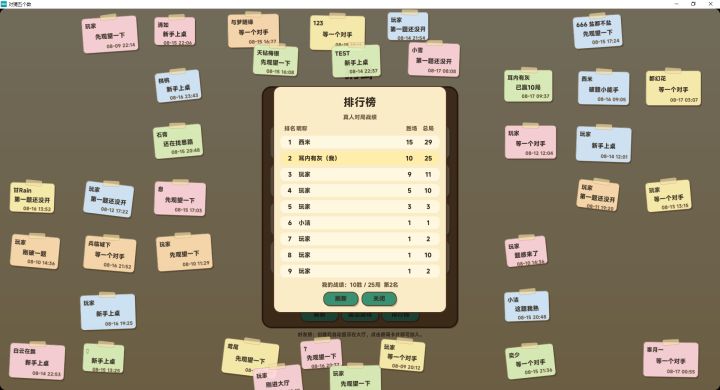
【日常更新】支持2人、3人、4人对战
优化了排行榜显示玩家昵称
@耳内有灰
3 赞
槽位变更只走原子方法
经验
下标 = 视觉格子,空槽是合法状态。定长 9 槽,inventory[i]=nil 即第 i 格空着,中间允许空。任何"把物品往前挪/压缩/重排"的操作都会让"你看到的格子"和"数组真实下标"脱节 → 物品消失。渲染直映 inventory[i],数据层绝不重排。
稀疏表禁用 #。带 nil 洞的表 #inv 是未定义的(可能=0 直接读成空包,或=洞前边界)。所有遍历上界一律 Player
官方
@耳内有灰
4 赞
地图编辑器地面交互与视觉优化
一、问题链
用户截图反馈了三个递进的问题:
问题 1:点击地面类型(如食堂地砖),弹窗不关闭,挡住画布无法操作
↓ 修复 v0.10.94
问题 2:地面贴图太大,一块地砖比小人还宽,比例失调
↓ 修复 v0.10.96(改配置值)
问题 3:改了配置值后刷新仍然太大——旧存档的 tileSize=256 优先级高于新 config
↓ 修复 v0.10.97(反转渲染优先级)
二、关键代码
官方
@耳内有灰
4 赞
地图编辑器仿真 tick 重建抑制
UI 重建频率 = 事件分发的可靠性上限。 只要有一帧 SetRoot 销毁了正在处理 pointer 事件的控件,跨重建边界的 Down/Up 对就会被吞。高频仿真 tick 必须在 UI 边界按页面过滤。
关键代码(scripts/main.lua HandleUpdate)
四步走:先原地处理人员 → 聚合所有仿真 changed → 地图页强制压制 → 只放行显式/登录态变化。
-- ma
官方
@耳内有灰
4 赞
修复"地图编辑器刷新数据丢失"
问题诊断过程
用户报告:编辑器建好房间 → 保存 → 刷新页面 → 进编辑器 → 数据全没了。
关键线索:用户发现"校园日"模式刷新后能看到房间,但一进编辑器就没了。
这直接指向了编辑器页面自身的初始化逻辑,而非持久化链路。
根因
地图编辑模式.lua 的 EnsureBlankEditorLayout() 设计意图是"首次打开编辑器提供空白画布",用模块级布尔 editorLayoutClear
官方
@耳内有灰
4 赞
图片加载三层优化设计
目标场景:地图编辑器"物品/墙体/地面/房间/人员"调色板弹窗的图片首帧显示 文档目的:沉淀"图片为什么慢、怎么治、发布后玩家体验如何、未来加资源时 preload_groups 怎么取舍"的完整结论,避免重复踩坑。
一句话结论 WASM 下图片"慢"不是单一问题,而是下载 / 解码 / 上传 GPU 三件事全堆在"玩家点弹窗那一刻"做导致的。优化的本质是把这三件事提前到启动期做(让玩家点的时候图
官方
@耳内有灰
1 赞
以鼠标为锚点缩放
核心数学原理
缩放前后,鼠标指向的那个世界坐标点必须保持在同一屏幕位置。
已知:旧缩放 oldZoom、新缩放 newZoom、鼠标锚点屏幕坐标 (ax, ay)、当前偏移 (panX, panY)
步骤1:算出旧缩放下鼠标指向的世界坐标
wx = (ax - panX) / oldZoom
wy = (ay - panY) / oldZoom
步骤2:新缩放后反解新偏移,让 wx/wy
官方
@耳内有灰
1 赞